BEFORESCROLL STUDIO

Lauds

Before the scroll, the light.
A Scripture-first app blocker for Android and iOS.
Android · Waitlist iOS · Waitlist
§ I   Manifesto

The first thing you reach for in the morning becomes the shape of your day.

Most of us reach for the feed. The thumb knows the way to Instagram, TikTok, X, Facebook — before the eyes are open. Twenty minutes gone, and the day has begun in someone else's noise.

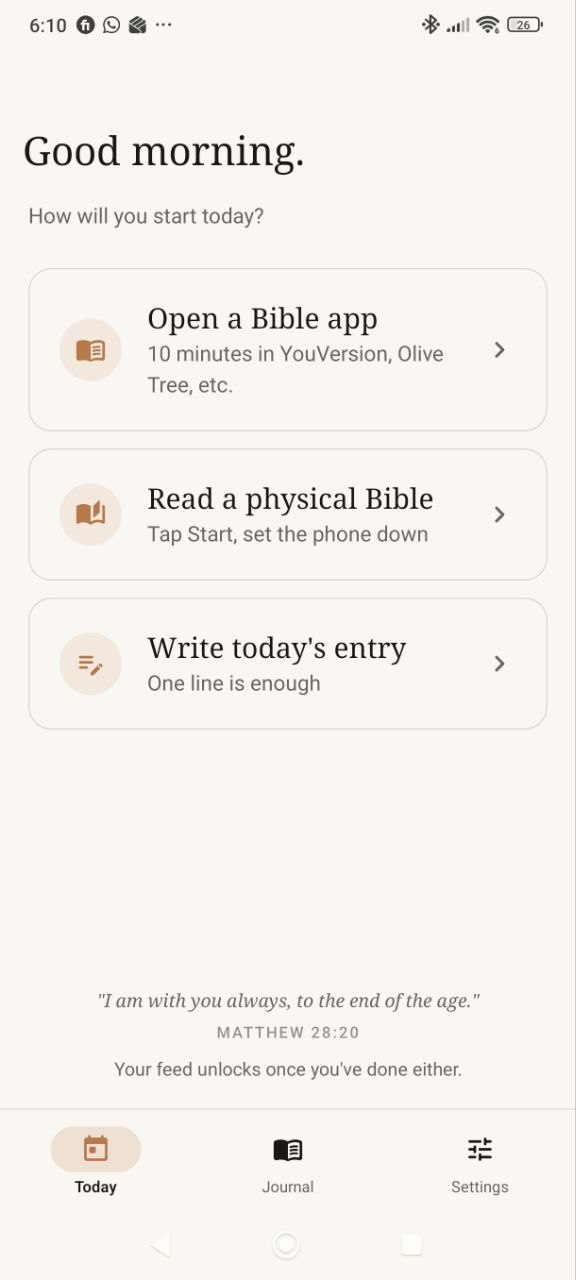
Lauds is the gate. A small lock on the apps that own your mornings — Instagram, TikTok, Reels, the rest. Try to open them, and Lauds asks one thing first: scripture. Open your Bible app, read from a physical Bible, or write a short journal line. Then the world is yours again.

Not a guilt machine. Not a screen-time scold. Just a door, with a small key shaped like a verse.

a gentle gate, before the feed
§ II
How it works

Four small steps,
between you and the feed.

i.

Pick the apps

Instagram, TikTok, Reels, X, Facebook, YouTube — anything you'd rather not open first. Set them and forget the list.

ii.

Reach as usual

You wake, you grab the phone, your thumb finds Instagram. Lauds steps in — a still screen instead of a feed.

iii.

Scripture first

Open your Bible app — YouVersion, Olive Tree, the one you already use — or start a quiet physical Bible timer. Lauds counts either as your morning.

iv.

The gate opens

The lock lifts. Scroll if you must — but the first word of your day was God's, not the algorithm's.

§ III
What's inside

A small lock
with a beautiful key.

Blocks the feed

Instagram, TikTok, Reels, X, Facebook, YouTube, Snapchat. Pick any and all. The block is firm, the unlock is small.

Bible-app aware

Use YouVersion, Olive Tree, Logos, or whatever Bible app you already love. Spend a minute reading; Lauds counts it as your key.

Or read your physical Bible

Have a paper Bible? Start the timer, set the phone down, and read. When the timer finishes, the gate lifts.

You set the window

Choose the morning hours when feed apps are held. Once you complete the morning, the gate stays open for the rest of that day.

A verse for the day

A single line of scripture on the lock screen. Quiet, direct, and never a substitute for the reading itself.

Private by design

Your journal stays on your device. We keep the shield path local so mornings still work without a server round-trip.

§ IV
Trust & privacy

What Lauds can see,
and what stays yours.

Lauds asks for powerful phone permissions because blocking apps is powerful. The rule is simple: use those permissions for the morning gate, keep intimate data on-device, and say plainly where each platform behaves differently.

No hidden feed of your journal. No server copy of selected apps. No web tracker on this site. The product has to earn trust before it asks for discipline.

Local first

Your private pieces stay on your phone.

The shield list, lock window, unlock state, and journal entries are designed as local app state, not a remote profile of your morning.

  • Journal text and photos are not sent to Lauds servers.
  • Selected blocked apps are not uploaded as a readable list.
  • Email is used for launch updates and referral access.
Android

Android can enforce the firmest gate.

Android lets Lauds detect when a chosen app opens and place the Lauds shield in front of it during your lock window.

  • Requires Accessibility and usage-access permissions.
  • Can block ordinary apps you choose.
  • You can disable the rule in Android settings.
iOS

iOS uses Apple's Screen Time path.

iOS does not allow arbitrary foreground-app interception. Lauds uses FamilyControls, DeviceActivity, and ManagedSettings instead.

  • Requires Apple's Screen Time authorization.
  • Uses opaque app/category tokens, not readable app names.
  • Requires Apple entitlement approval before public release.
Limited anonymous mobile analytics may be used to understand onboarding and paywall health. Lauds does not collect journal text, photos, selected app lists, foreground app names, Screen Time tokens, email inside analytics events, or raw referral codes.
§ V
A look inside

What the lock
actually looks like.

What you see
when you reach for the feed.

You tap Instagram. Lauds intercepts. A single still page, a verse, and three quiet doors — a Bible app, a physical Bible timer, or a short journal entry. Pick one; the lock lifts.

  • block The app you tried to open, gently held.
  • verse A line of scripture for today.
  • key Open a Bible app, read physically, or write a short entry.
  • open The feed unlocks for the window you set.
8:42● ● ●
Lauds · Instagram held
A small gate before the feed
Scripture first.
"This is the day that the Lord has made; let us rejoice and be glad in it." Psalm 118 : 24
Choose your key
Bible app · physical Bible · journal
§ VI   Early access

Lauds is open
for early hands.

Android is headed to Google Play soon and can pay inside the app. iOS follows later, so the website lifetime checkout is now for iOS early access only.

Join now

iOS lifetime early access.

$99.9933% off future $149.99

Pay once through Stripe for iOS lifetime access when Lauds opens on iPhone. Android readers can buy lifetime in Google Play from inside the app.

  • One-time iOS lifetime purchase
  • Earliest iOS launch email
  • Android checkout stays in Google Play
  • No subscription, no renewal
Free waitlist

Just the launch note.

Leave your email and we will write when your platform opens. No discount, no early-access claim, no referral reward from this form.

You're on the list.

Watch your inbox for the next Lauds invite.

The free waitlist is launch-email only.

Android waitlist · iOS waitlist
Two doors, clearly marked
Paid iOS lifetime gets the earliest iPhone launch email. Android can buy inside Google Play when the app opens.
$99.99 iOS lifetime
Free waitlist remains email-only
§ VII
Pricing

Less than a coffee.
For as long as you keep mornings.

Monthly
$6.99/ month
Block as many apps as you want, change them whenever. Cancel any time — your habit stays with you.
  • Block any app on your phone
  • Bible-app detection (YouVersion, Olive Tree, more)
  • Physical Bible timer unlock
  • Customisable unlock window
  • Earn 14 days, 14 more days, then 3 months for every 3 activated friends
  • During Android launch, 3 activated friends unlock lifetime access
Begin
Annual
$49.99/ year
A quieter yearly plan for people who already know they want Lauds in their mornings.
  • Everything in monthly
  • Almost six months free
  • Cancel any time in Google Play
Begin
Promo codes and referral rewards still live inside the app.
They do not stack with a paid lifetime purchase, and referral rewards have no cash value.
§ VIII
From the testers

The first words
are still being written.

Honest line: we don't have testimonials yet. The first waitlist is open.

Tester #001 — reserved for you
Join below; tell us how it goes.

When you've used Lauds for a week, write us a line. The good ones live here.

Tester #002
Reserved — radiansnail@gmail.com

Until then — our promise. No fake reviews, no astroturfed quotes. Real testers, real words, or none.

A rule we keep
BeforeScroll Studio
§ IX
Frequently asked

Questions, gently.

So Lauds doesn't have its own readings or prayers?
Right. Lauds isn't another Bible app — it's the small lock between you and the feed. We send you to your Bible app (YouVersion, Olive Tree, Logos, the one you already love), or let you use a physical Bible timer. The verse on the lock screen is a small daily nudge, not a substitute for the real thing.
Which apps can it block?
Anything on your phone. We pre-list the usual suspects — Instagram, TikTok, Reels, X, Facebook, YouTube, Snapchat, Threads — and you can add any other app you want held until you've opened scripture.
How does the physical Bible unlock work?
Start the physical Bible timer, set the phone down, and read. When the timer completes, Lauds marks the morning done and opens the feed for the day.
Which Bible apps does it detect?
YouVersion is the big one; we also support Olive Tree, Logos, Blue Letter Bible, NIV Bible app, ESV Bible app, and a growing list. If you use one we miss, tell us — we'll add it.
Can I just bypass the lock?
If you really want to, yes — Lauds is a gentle gate, not a prison. You can turn it off, change apps, or shorten the rule. The point isn't to trap you; it's to make scripture the easier reach than the feed.
Why only Android right now?
We're a small team and chose to ship one platform really well before splitting our attention. Android is headed to Google Play first; iOS is in build and planned later. Join the waitlist either way — we'll write when your platform opens.
How do I get the app?
Drop your email in the form above. Android readers get the Google Play link when launch opens. iOS readers get TestFlight or App Store news when that build is ready.
Is my data private?
Your journal stays on your phone. Selected blocked apps are not uploaded as a readable list, and foreground app names are not sent in analytics. We use email for launch updates and may use limited anonymous mobile analytics for onboarding and paywall health. We don't sell or share your data.
§ X
From the maker

A note on why
this exists.

portrait
of the founder
· coming soon ·

I built Lauds because I couldn't stop scrolling. I'd wake up, reach for Instagram before the eyes were open, and lose forty minutes to a feed I didn't enjoy and didn't remember by lunch. I tried screen-time apps. I tried hiding the phone in another room. I tried sheer willpower. None of it stuck.

What worked, eventually, was a tiny rule. Before Instagram, scripture. Even a page. Even a verse. After a few weeks, the order of my morning had quietly flipped. So I built the rule into the phone — a small lock with a small key, so the right thing was easier than the wrong thing.

I'm one person, building this slowly. If you sign up, you'll hear from me directly — not a marketing team, not a chatbot.

With care, in the early hours — BRIAN
§ XI
Mentions, kindly

No one has written
about us yet.

An open invitation

Writing about morning habits, the attention economy, or the quiet church of small software? We'd love a conversation.

Product facts, platform status, privacy posture, and contact details now live on the press page.

Open the press page